Showing posts with label gadgets. Show all posts

Limiting the Use of Gadgets - Parents Edition

Once in a while, Dens and I would have talks with our children on how we can do better as parents. During one of our recent discussions, my 5-year old daughter said "I wish mommy would not look at her iPhone too much". Eeps! Dens has been telling me the same thing for quite some time now but hearing it from my children was truly a wake-up call.

Social media has admittedly been a great tool to stay in touch with friends.  It bridges the physical gap and allows us to stay connected with those we rarely see.  However, I also realized recently that constantly catching up with friends on social media has been making me lose face time with the people that I am physically with. With that, Dens and I have recently agreed to limit the use of our phones while we are with the family. We would check messages and respond to urgent ones but limit the chats to when we are alone or when the kids are busy with their own activities.

Doing so has made me more present for my children. I realized that being present can translate to something as simple as looking at my children's eyes when they are talking to me. It means I no longer respond to their questions while staring at the 2 x 5 screen on my hand. 

In this gadget-laden world where we, as parents, try to find means and ways to limit our children's screen time, I wonder what example we are modeling.

A few nights ago, as I was putting the kids to sleep, we sat on the bed as we usually do.  But on this particular night, I turned off my phone and placed them on the night table beside our bed.  I listened attentively as my children told me about their favorite animals and the toys they are currently saving up for. While I stared at their wide little eyes and the excited smiles on their faces, I remembered that childhood is fleeting. And with my gadget-free hands, I embraced my children and pray that they will always know how precious they are to me.


Read more...

Smart Plugs

During the holiday season, fire safety is often a concern.  With all the Christmas lights and additional electrical usage, more caution is definitely required to keep our homes safe.

A few months ago, one of my friends told me about Smart Plugs. It honestly took me a while to appreciate the concept since it looks just like a regular electrical outlet to me.  At first glance, i noticed that it uses USB sockets instead of the usual ones that we have been used to.  So i thought...it's true that a lot of gadgets come with USB cords these days, but my cynical mind questioned its value.  Why not just plug my USB cords into the power adaptors that come with it? It will charge my gadgets just the same anyway.  So I decided to do my own research. My findings scared me enough to ask my friend to install the Smart Plugs in our home. 

A year after i bought my first iPhone in 2008, the power adapter stopped working. The USB cord was fine but i had to purchase a new adapter otherwise I'll be left charging my iPhone through my Laptop all the time.  I initially thought of going the cheaper route of buying a generic power adapter. But my office mate told me how his generic charger eventually damaged the battery of his iPhone making its life shorter. So i decided to buy the original, though more expensive, adapter from Mac.  After my recent research, i felt relieved that i bought the original charger. Apparently, there have been cases of generic power adapters exploding and nearly burning the house down.
photo from www.dailymail.co.uk
After further research, i later on learned that even original power adapters from reputable companies are not free from danger. These original power adapters have also been known to overheat to dangerous levels. In fact, Apple has recalled millions of iPhone 3G adapters in 2008 for similar reasons. 

All of these findings lead me to believe that the danger is really in the power adapter. So what's my solution then? Smart Plugs! Yes, i finally appreciated its function.  We had it installed and are now happily  charging without power adapters at home.  Installation is not too complicated. Ours took less than an hour to complete.  I still keep the power adapters for traveling, but I can rest easier knowing that  our family is safe from the risk of shock hazards that power adapters bring. 

Smart Plugs come in four styles (see picture below).  We had the FU-A25C installed near our bedside table.  It comes with an electrical socket that we use to plug our table lamp and two USB chargers to plug in my iPhone and Blackberry. Just perfect for a two-gadget gal like me.
I encourage you to try it out. It's also good to install the purely USB plugs in your child's bedroom or play area so that there is no danger of them touching an open electrical outlet. 

Order your Smart Plugs today! Check out the contact details below.


RCC Solutions Inc.
☎      +63 2 717-0877 / +63 2 577-6689
📠       +63 2 621-7465
📱       +63 917 598-6275 / +63 922 813-4671
📧       jlee@rccsolutions.com.ph


Read more...

iPhone Teaches Kids to Share

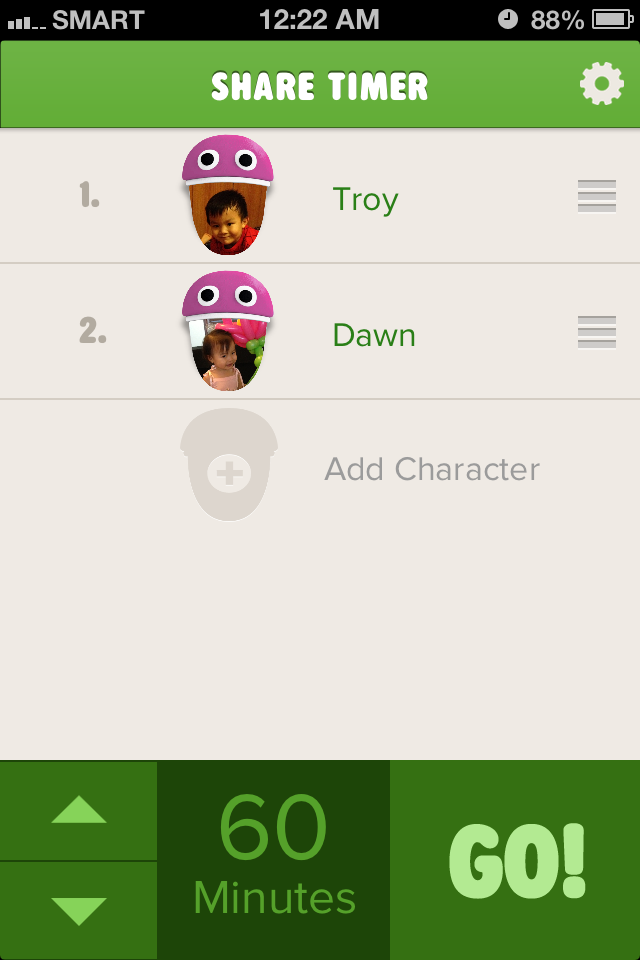
Last week, i saw Cym's (@ceemee) tweet about a sharing application. I got curious and downloaded it right away. It's a nice way to teach kids to take turns.  It's particularly useful for kids who need to learn how to share a family iPad, a toy, or take turns when watching TV at home.

3 Easy Steps to Sharing:

STEP 1: Upload the child's picture so that they will know it's their turn even if they cannot read yet. You will also be asked for their names.

STEP 2: Select the number of minutes for each turn. It can go from 1 minute to 1 hour.
STEP 3: Click on GO! The timer will immediately start running. It will tell the user when he or she has 10 seconds left (yes, the application talks!). The current user will see his or her picture at the bottom center of the screen. The person next in line will have his or her picture at the top center.
I programed Troy and Dawn on my iPhone and showed it to them. Both of them kept on laughing at their pictures on the screen. They were also excited that it became a game to them. They would set it to 1 minute and pass the iPhone to the next person when their time runs out. They were not using the application as a share timer for other toys - they were sharing the application itself! haha! Oh well...

Try it for your kids. They might just enjoy the concept of sharing. The application on the iPhone is called Storybots Share Timer. Search for it on the App Store.

Read more...

MiLi Power Crystal

I've never done a gadget review before but this one is worth mentioning. I got a white MiLi Power Crystal from my sister for Christmas.

The MiLi Power Crystal is actually an external charger (power bank) for your gadgets. It comes with several adapters to match different ports from iPhones to Blackberries. I personally use it for my iPhone 4s, Blackberry Bold, and Smart Bro pocket wifi.

http://milipowercrystal.com/
Product Specifications (taken from MiLi Philippines' site)
Capacity: 2,000mAh
Input: DC5V / 500mA
Output: DC5V / 500mA
Standby Time: Up to 230 hours
Charging Time: 4.5 hours
Self-Power Consumption Time: Up to 5,000 hours
Product Dimensions: 3.4" x 2.1" x 0.6"
Colors: Black, White, Blue, Green, Orange, Pink

I love that i don't have to worry about running out of batteries while in transit. Another thing that i found really helpful is using it to charge my gadgets overnight. My rule at home is not to charge our gadgets while sleeping because I am scared of it being a fire hazard. On the other hand, sleeping with a low battery iPhone has failed me several times when the alarm didn't go off because the battery has drained come morning. Last night i found my iPhone to only  have 6% battery as I was about to sleep. I plugged in my MiLi and woke up to a 98% charged iPhone. Lovely, isn't it?

I am not a techie person but love, love,  love this MiLi power charger! It comes it a little black pouch so it's easy to carry around for battery emergencies.

Learn more about the different types of power banks from their official website (http://miliphil.com/). The power cyrstal costs around P1, 600. Not bad for all the convenience.

Read more...

  © Theme Designed by Fancy Girl Designs 2011 for Breakfast with Tiffany

Back to TOP